
SQL Syntax - A Beginner's Guide
Structured Query Language (SQL) is the backbone of relational database management systems (RDBMS), enabling users to interact with databases effectively.
SQL syntax consists of keywords with a unique set of rules for writing SQL statements. Understanding SQL syntax is crucial for anyone working with databases, whether you're a seasoned developer or just starting your journey in data management.
In this beginner’s guide, we’ll list all the SQL syntax and their usage in constructing queries effectively.
Understanding SQL Queries
At its core, SQL is a language used to communicate with databases. It allows users to retrieve, manipulate, and manage data stored in a relational database management system (RDBMS). The primary operation in SQL is the query, which is a request for specific information from a database.
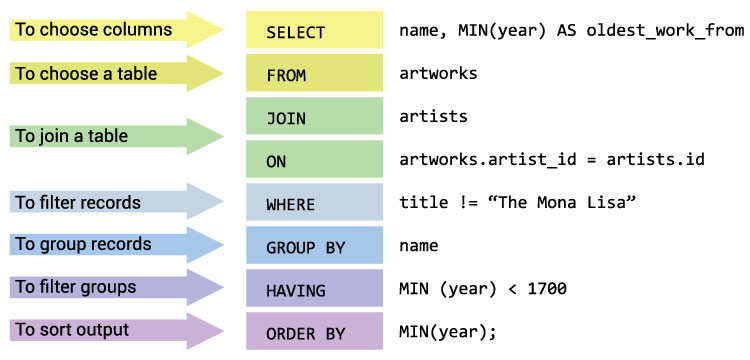
Note: SQL keywords are case insensitive, which means SELECT and select have the same meaning in SQL statements.
SQL Syntax Rules
- SQL statements are case-insensitive, but table and column names may be case-sensitive depending on the database.
- SQL statements end with a semicolon (;).
- Clauses are used to specify conditions, such as
WHEREandHAVING. - Parentheses are used to group expressions and clarify order of operations.
- Commas separate items in a list, such as column names or values.
Basic SQL Syntax
SQL syntax is composed of the following elements:
- SELECT: Retrieves data from a database table.
- FROM: Specifies the table(s) to retrieve data from.
- WHERE: Filters data based on conditions.
- GROUP BY: Groups data by one or more columns.
- HAVING: Filters grouped data based on conditions.
- ORDER BY: Sorts data in ascending or descending order.
- INSERT INTO: Adds new data to a table.
- UPDATE: Modifies existing data in a table.
- DELETE: Deletes data from a table.
- CREATE TABLE: Creates a new table in the database.
- ALTER TABLE: Modifies an existing table (e.g., adding or dropping columns).
- DROP TABLE: Deletes a table from the database.
- JOIN: Combines rows from two or more tables based on a related column between them.
- INNER JOIN: Returns rows when there is at least one match in both tables.
- LEFT JOIN: Returns all rows from the left table and matching rows from the right table.
- RIGHT JOIN: Returns all rows from the right table and matching rows from the left table.
- FULL OUTER JOIN: Returns all rows when there is a match in either table.
- DISTINCT: Retrieves unique values in a column.
- AS: Renames a column or table with an alias.
- LIKE: Searches for a specified pattern in a column using wildcard characters.
- IN: Specifies multiple values for a column.
- BETWEEN: Selects values within a given range.
- NULL: Represents NULL values in the database.
- IS NULL: Checks if a value is NULL.
- NOT NULL: Checks if a value is not NULL.
SELECT
The SELECT statement stands as one of the most fundamental keywords in SQL. It allows users to retrieve data from one or more tables
within a database. It follows this basic structure:
SELECT column1, column2, ...
FROM table_name;
For example:
SELECT * FROM customers;
This retrieves all data from the "customers" table.
FROM
The FROM clause specifies the table(s) to retrieve data from.
SELECT column1, column2, ...
FROM tablename1, tablename2, ...;
For example:
SELECT orders.order_id, customers.customer_name
FROM orders, customers
WHERE orders.customer_id = customers.customer_id;
This retrieves data from the "orders" and "customers" tables where the customer ID matches.
WHERE
The WHERE clause is used to filter records based on specified conditions. It is typically used in conjunction with the
SELECT statement to retrieve only the rows that meet the specified criteria.
SELECT column1, column2, ...
FROM table_name
WHERE condition;
For example:
SELECT *
FROM orders
WHERE order_date >= '2024-01-01';
This retrieves data from the "orders" table where the "order_date" is "2024-01-01" or greater than "2024-01-01".
ORDER BY
The ORDER BY clause is used to sort the result set in ascending or descending order based on one or more columns.
SELECT column1, column2, ...
FROM table_name
ORDER BY column1 [ASC|DESC];
For example:
SELECT *
FROM products
ORDER BY price ASC;
This retrieves data from the "products" table and sorts it in ascending order by product price.
INSERT
The INSERT statement adds new data to a table.
INSERT INTO tablename (column1, column2, ...)
VALUES (value1, value2, ...);
For example:
INSERT INTO customers (customer_name, email, country)
VALUES ('John Doe', 'johndoe@example.com', 'Nigeria');
This adds a new customer to the "customers" table.
UPDATE
The UPDATE statement is used to modify existing records within a table. It allows users to change the values of specific columns in
one or more rows based on specified conditions.
UPDATE tablename
SET column1 = value1, column2 = value2, ...
WHERE condition;
For example:
UPDATE customers
SET hobby = 'Coding'
WHERE customer_id = 1;
DELETE
The DELETE statement is used to remove records from a table based on specified conditions. It allows users to selectively delete rows
that meet certain criteria. DELETE statements should be used with caution to avoid unintended data loss.
DELETE FROM tablename
WHERE condition;
For example:
DELETE FROM customers
WHERE customer_id = 1;
This deletes the customer with ID 1 from the "customers" table.
Advanced SQL Syntax
JOIN
The JOIN clause is used to combine rows from two or more tables based on a related column between them.
SELECT column1, column2, ...
FROM table1
JOIN table2 ON table1.column_name = table2.column_name;
For example:
SELECT customers.customer_id, orders.order_id
FROM customers
JOIN orders ON customers.customer_id = orders.customer_id;
GROUP BY
The GROUP BY clause is used to group rows that have the same values into summary rows, typically used with aggregate functions like
COUNT, SUM, AVG, etc.
SELECT column1, aggregate_function(column2)
FROM table_name
GROUP BY column1;
For example:
SELECT customer_id, COUNT(order_id)
FROM orders
GROUP BY customer_id;
This groups data from the "orders" table by customer ID and counts the number of orders for each customer.
HAVING
The HAVING clause is used to filter records returned by the GROUP BY clause based on specified conditions.
SELECT column1, aggregate_function(column2)
FROM table_name
GROUP BY column1;
HAVING condition;
For example:
SELECT customer_id, COUNT(order_id)
FROM orders
GROUP BY customer_id
HAVING COUNT(order_id) > 5;
This groups data from the "orders" table by customer ID, counts the number of orders for each customer, and filters the results to only show customers with more than 5 orders.
SQL Syntax Best Practices
- Use meaningful table and column names.
- Use parentheses to clarify order of operations.
- Use single quotes for string values.
- Use commas to separate items in a list.
- Use semicolons to end SQL statements.
- Use uppercase for SQL keywords and lowercase for table and column names.
Conclusion
Understanding SQL syntax is essential for working with databases. While this guide covers the basics, there are many more advanced features and functions within SQL to explore. By following best practices and using SQL syntax correctly, you can efficiently manage and retrieve data from databases.
Additional Resources
- W3Schools SQL Tutorial: A comprehensive tutorial on SQL syntax and usage.
- SQLCourse: A website offering SQL tutorials, examples, and exercises.
- Database Management Systems: A book by Raghu Ramakrishnan and Johannes Gehrke covering database concepts and SQL syntax.